News /Oct 29, 2026 /14 min read
What's New in BetaHub — September & October 2026
Sentiments now answers questions, sends drama alerts and writes a report for every release; Steam Discussions brings Steam forum posts in as bugs and suggestions; Discord reports can be guided forms; plus Bug Map, Scheduled Releases, suggested answers for tickets, background uploads in the Unreal Engine 5 plugin, Trello and Asana updates, and GitLab two-way sync.


This cycle covers early September through late October. Sentiments got the most work: you can now ask it questions in plain words, get an alert when the mood in your Discord drops, and receive a report a week after every release. Steam Discussions brings Steam forum posts into BetaHub, Discord reports can now run as step-by-step forms, and the Bug Map plots located bugs over your game’s map.
Sentiment Checks (Beta)
Ask a question about your community in plain words, for example “Is the grapple thing better now?”, and BetaHub answers from your Discord and Steam conversations.
- It asks only what it can’t find. It looks at your releases, bugs and messages first, then asks for missing facts, such as the fix date per platform.
- You check the plan first. Before it runs, it shows a plan you can correct in plain words.
- The verdict comes with numbers. A few minutes later you get a verdict backed by quotes (key phrases in Private mode). A fix check also shows how many of the people who complained have stopped, per platform when the fix reached platforms on different days.
- People, not messages. Results are counted per person and per active player, so a busier week doesn’t skew them.
There are three kinds of check:
- Did a fix land
- How a release compared with the one before it, down to each item in the patch notes. A first release is compared with its own 14 days before (Mood rose, Mood held or Mood dropped).
- How a sale or free weekend went, with regulars and new players side by side
Available on Pro and Enterprise under Sentiments → Sentiment checks.
Sentiment Checks documentation
Drama Alerts
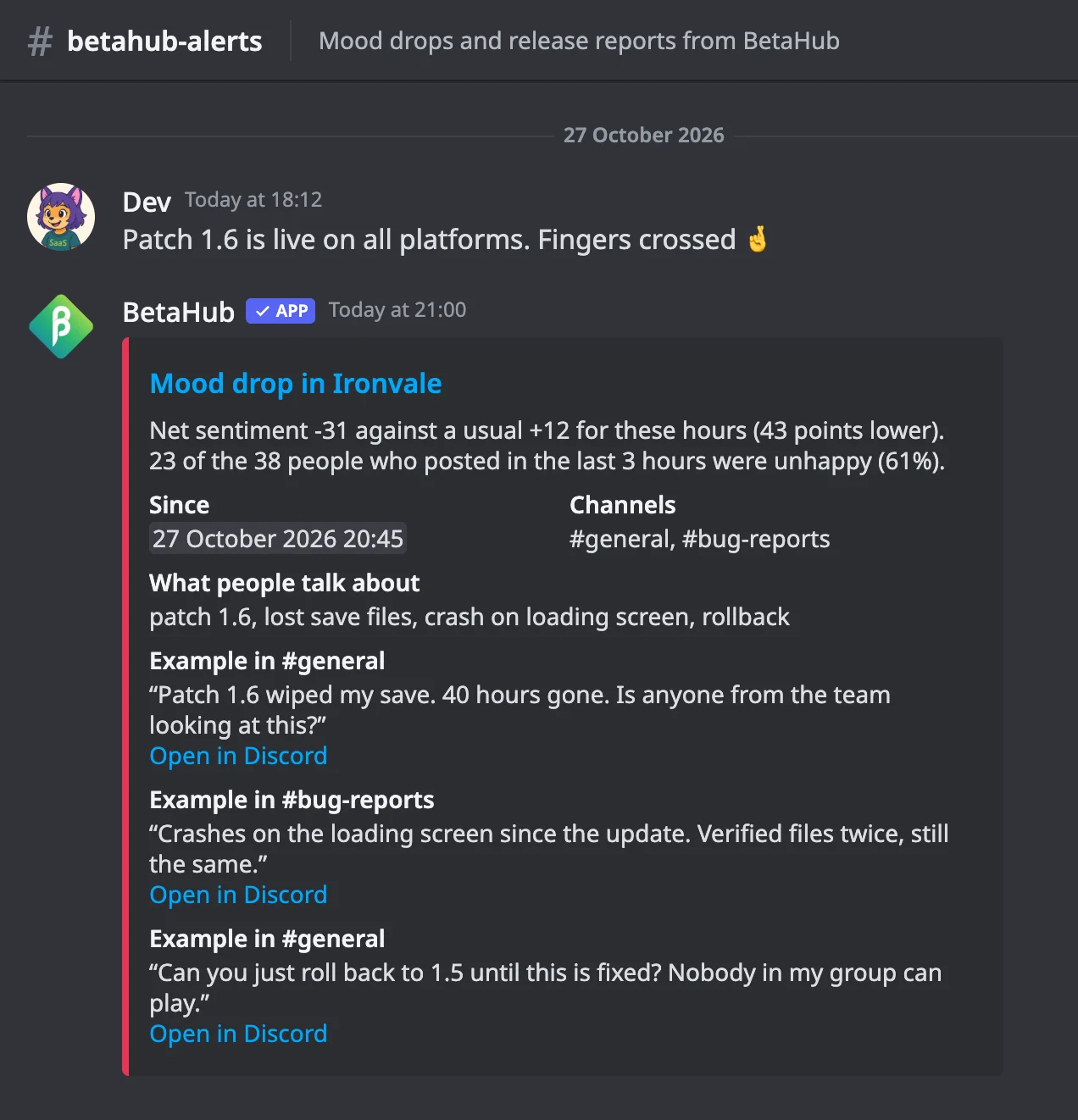
BetaHub now alerts you within minutes when the mood in your Discord drops sharply. Every 15 minutes it compares the last 3 hours with the same hours over the past week and sends one alert per drop, with a follow-up if it gets worse.
- Counted in people, not messages, with your team’s messages and raids left out
- Sent by email to the members you pick, to a Discord channel, and to webhooks
- Each alert shows how far the mood fell, since when, in which channels, how many people were unhappy, what they’re talking about, and a few examples with links to Discord (key phrases in Private mode)
- Ongoing alerts also appear on your project dashboard and on the Sentiment Direction chart
Set it up under Settings → Sentiments → Alerts.
Automatic Release Reports
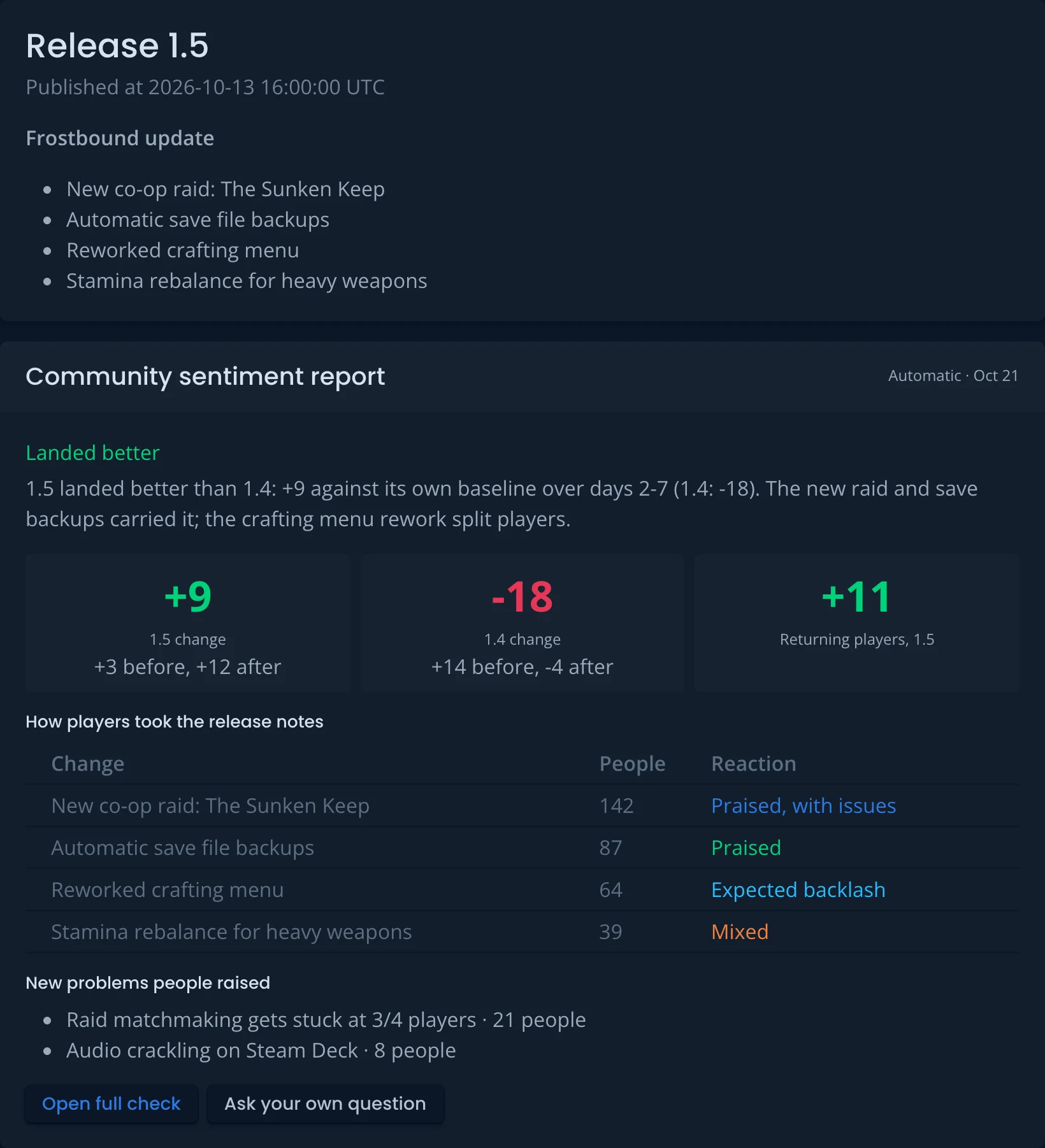
A week after you publish a release, once its 7th day is over, BetaHub writes a release report on its own. The report shows:
- the mood after the release, compared with your usual mood and with the previous release
- how players took each item of the release notes
- new problems that came up
The report appears on the release page. Until day 7, the page shows a preliminary read: the mood, how many people are talking, and the main topics. To also get the report by email and in Discord, turn it on under Settings → Sentiments → Alerts.
Hotfixes and releases created automatically from bug reports don’t get a report.
Automatic Release Reports documentation
More Sentiments Updates
Team roles. Messages from your own team no longer count as player sentiment. BetaHub suggests team roles from your Discord server: roles with moderation permissions (such as Manage Messages or Ban Members) and roles named like Developer, Moderator or Community Manager. Members with those roles are left out of the dashboard, AI insights, crisis flags and Sentiment Checks. Check and correct the list under Settings → Sentiments → Team roles. Your choices always win. Dashboard numbers change once roles are suggested, including for messages already collected. To see a team role’s messages, pick it in the role filter. Team Roles documentation
Message storage. Under Settings → Sentiments → Privacy, choose what BetaHub keeps from your Discord sentiment channels:
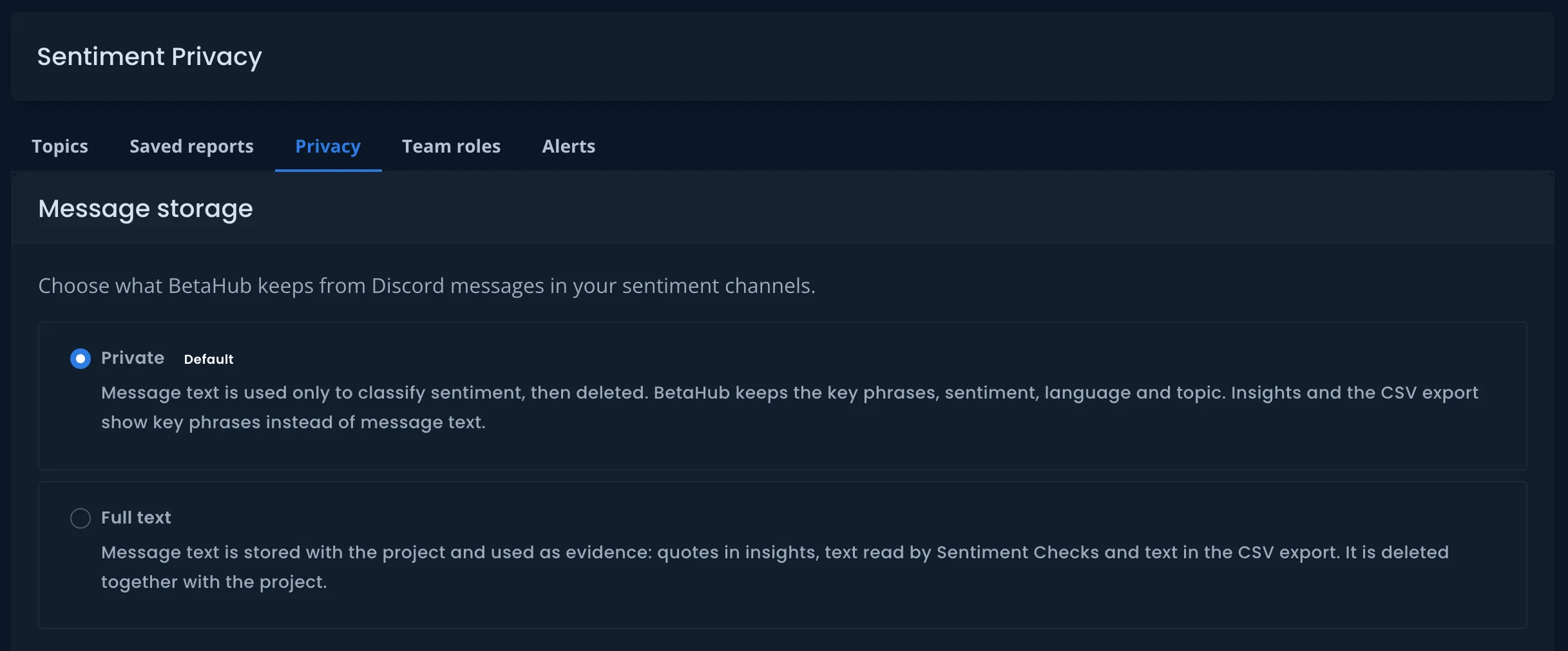
- Private (the default): a message’s text is used only to classify its sentiment, then deleted. BetaHub keeps the key phrases, sentiment, language and topic, along with the Discord message ID, channel and the author’s Discord ID.
- Full text: the text is stored and used for quotes in insights, Sentiment Checks and the CSV export.
Projects that didn’t have full-text processing turned on are now in Private mode. Text that was already stored stays. A change applies only to messages that arrive after it. Message Storage documentation
History import. While your Discord history in BetaHub is still short, the Sentiments page offers to import past messages from your sentiment channels. Our team then runs the import: by default the last 30 days, up to 20,000 messages. Included in Enterprise. On other plans with Sentiments, ask us. History Import documentation
Saved reports. Save a named set of channels and get its own AI insights, topics, summary and dips, separate from your whole-community view. Projects can keep 1 saved report on Pro and 3 on Enterprise. Saved Reports documentation
Retries. A message that fails classification is now retried after 15 minutes and after 2 hours instead of being skipped.
Steam Discussions
Connect your game’s Steam Community Hub, and BetaHub reads its discussion boards:
- Bug reports become bugs.
- Requests that keep coming up become suggestions.
- Matches are added to your existing bugs and suggestions instead of creating duplicates.
- Posts feed Sentiments, with one channel per sub-forum. See messages opens the Steam posts behind an insight.
- Pinned support megathreads can be read reply by reply, so each reply can become its own report. Turn off Skip pinned threads to use it.
BetaHub checks for new threads once a day, and your digest gets one Steam summary line instead of an entry per import. BetaHub only reads: nothing is posted to Steam, and players are never notified.
Available on Pro and Enterprise. Connect a game from Steam Discussions in your project’s sidebar.
Steam Discussions documentation
Discord Submission Forms
/report, /suggest and /ticket can now open a short guided form. Players answer one step at a time in messages only they can see, tapping a choice or opening a text box for details, and the bot files the report when they’re done.
- Build forms under Forms & Surveys, with a live Discord preview.
- Save answers to custom fields, so each answer arrives as structured data.
- Conditional steps appear only when an earlier answer matches.
- Suggestion forms can check for similar ideas first and let the player vote on an existing one instead of posting a duplicate.
- Bug forms can ask for steps to reproduce as a separate field.
Make a form the default for its command with /set default_bug_form (or default_suggestion_form / default_ticket_form), or post a button that opens it with /post_form.
Discord Submission Forms documentation
Bug Map
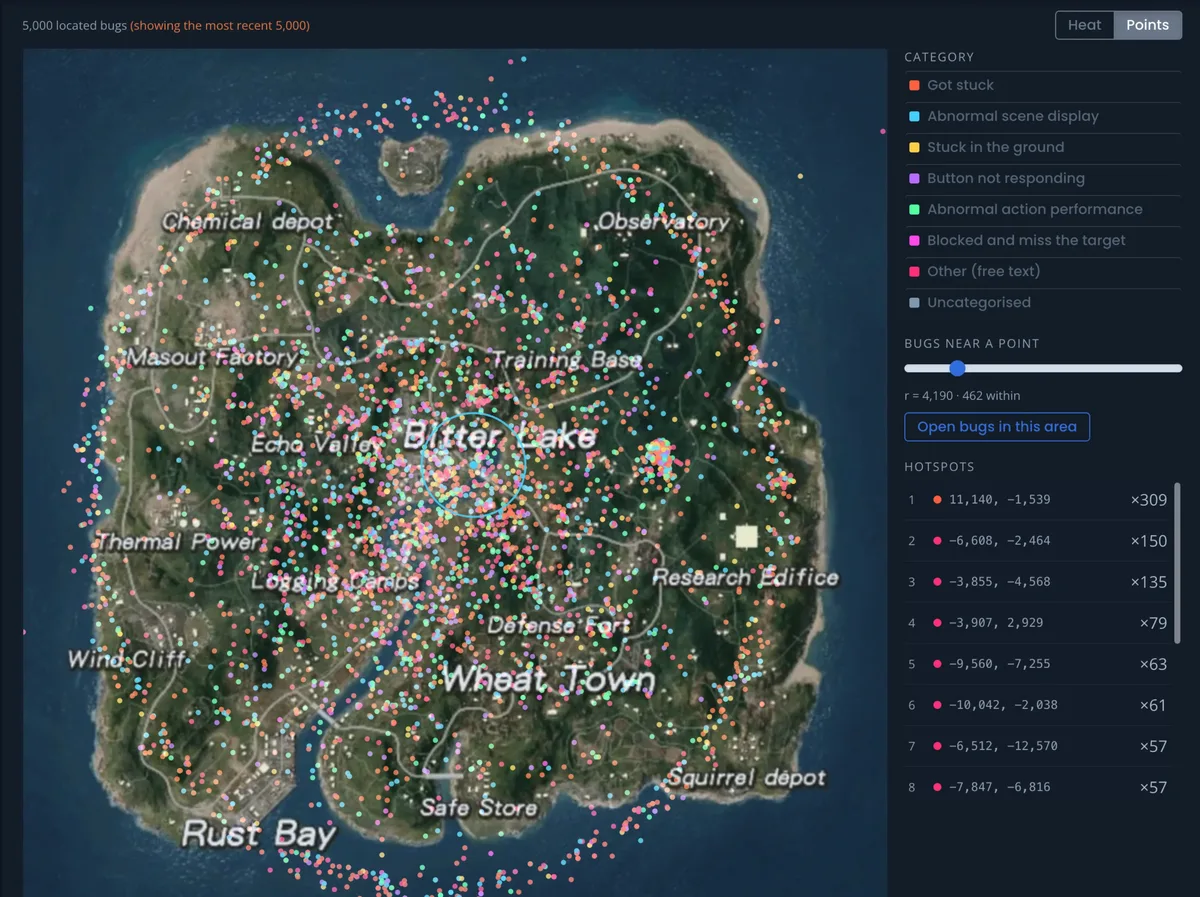
Turn on the new Maps module, upload a top-down image of your game’s map and align it once. Reports that carry a location are then plotted onto it.
- Two views: a heatmap of clusters, or individual points you can filter by category, date and area
- Hotspots: click one to open the reports there, or drop a radius to pull in every report nearby
- Coordinates field: add a Coordinates custom field so players can pin where a bug happened, or send coordinates straight from your game
- Raw reports: high-volume telemetry can be submitted as raw. It shows on the map but stays out of your bug list, search and the public board.
Scheduled Releases
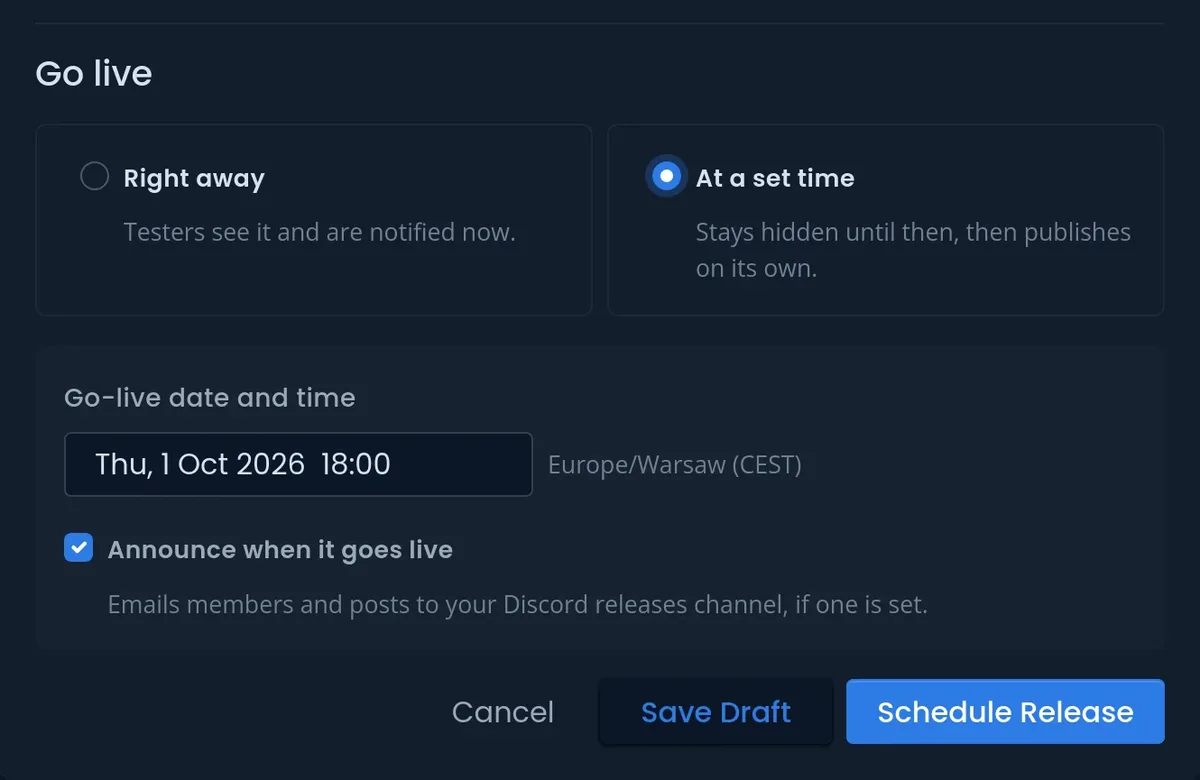
When creating or editing a release, choose At a set time under Go live and pick a date and hour in your own timezone. Until then, the release stays hidden from testers, just like a draft.
- Announce it or not: decide up front whether BetaHub emails your members and posts in your Discord releases channel when the release goes live.
- Countdown: scheduled releases sit at the top of your Releases page with a countdown, where you can Edit, Publish now or Cancel schedule.
- Release dates: releases are now dated by when they went live, so a build you prepared early but published later still counts as your latest.
- API: send
release[auto_publish_at]when creating a release.
Scheduled Releases documentation
Suggested Answers for Tickets
New support tickets now arrive with a draft reply when your Support Knowledge base has an answer. Open the ticket and the suggestion sits above the reply box. Click Insert into reply to put it in the editor, then review, edit and send it yourself.
Nothing is sent automatically, and you can regenerate the draft at any time. Available on projects with Support Knowledge enabled.
Suggested Answers documentation
Add to Knowledge Base from Discord
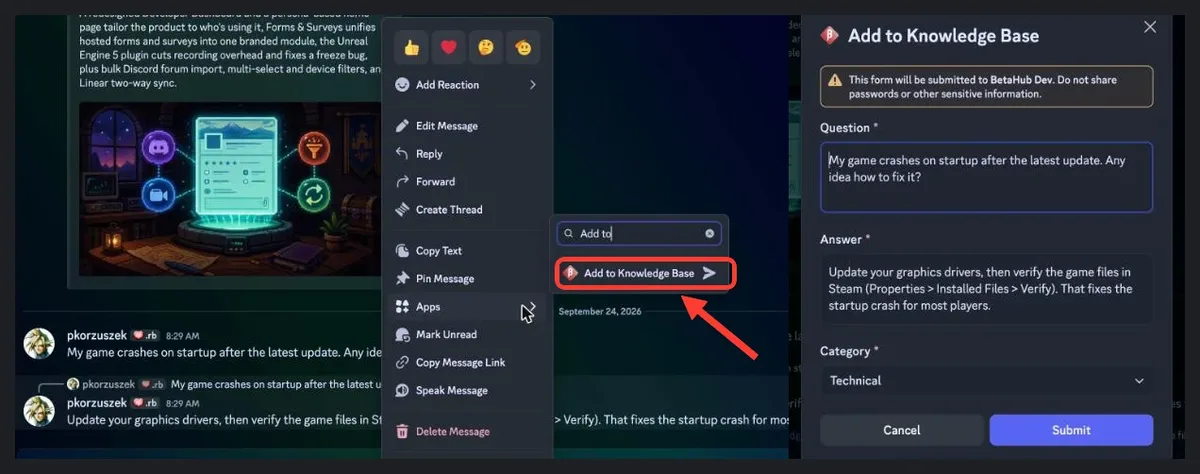
Answered a player’s question in Discord? Right-click your reply → Apps → Add to Knowledge Base. The question you replied to and your answer are filled in for you. Tidy them up and save. The bot can then use your answer when someone asks something similar. Saving the same message again updates the entry.
Add to Knowledge Base documentation
Unreal Engine 5: Reports Upload in the Background
In version 1.7.0 of the Unreal Engine 5 plugin, available on GitHub Releases, the report form closes as soon as the report is created on BetaHub. The screenshot, video and logs upload in the background. Before, players waited for the whole submission, which could take around 15 seconds on projects with heavy server-side processing.
- This is the new default when you update from 1.6.x. To keep the old behavior, set Project Settings → Plugins → BetaHub Bug Reporter → Media Upload Mode to Wait for upload.
- No lost reports: if the plugin’s final publish call is lost, BetaHub publishes the report anyway.
- No overwritten media: each report’s screenshot and video now get unique file names, so a second report can’t overwrite the first while it’s still uploading.
Unreal Engine plugin documentation
Automation Rules: Content and AI Conditions
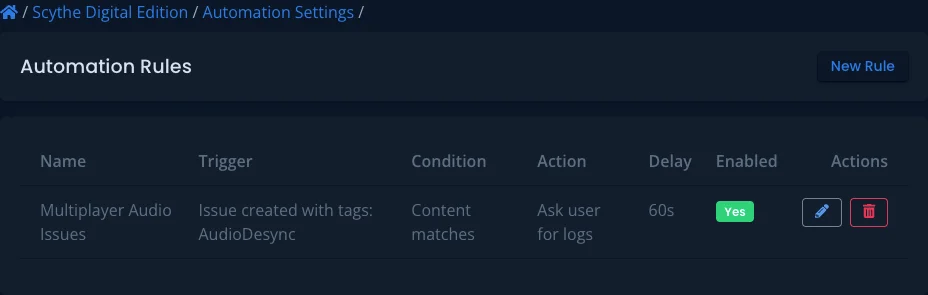
Automation rules can now act on what a report says:
- Text rules: match a bug’s title or description with contains, doesn’t contain, exact match, or too short / too long rules.
- AI check: let AI decide whether a report is too vague, incomplete or off-topic.
When a rule matches, it can tag the bug or archive it. Archived bugs aren’t deleted, so you can still find and restore them. The AI check runs on a monthly allowance that scales with your plan. When it runs out, your text rules keep working.
Set it up under your project’s Automations.
Automation Rules documentation
Integrations: GitLab, Trello and Asana

GitLab two-way sync. Close or reopen an issue in GitLab, or apply a label you’ve mapped, and the linked BetaHub bug updates. In the other direction, a bug’s status can apply a label to its GitLab issue. Changes you push from BetaHub don’t bounce back. Turn it on per integration in your project’s GitLab settings. Optionally, turn on Mirror comments to GitLab to post public bug comments as GitLab notes. GitLab two-way sync documentation
Trello. Bugs can now become cards on a Trello board. Click Connect with Trello to authorize BetaHub. Map the card name, description, list, labels, members, due date and board custom fields (except checkboxes). Turn on incoming sync and map lists to statuses, and moving a card to another list updates the bug’s status in BetaHub. Labels and members you add by hand in Trello are kept when BetaHub updates the card. Trello documentation
Asana field mapping. Asana integrations can now map task name, description, section, due date and custom fields. Existing integrations keep creating the same tasks as before. Asana documentation
Every integration’s field mapping can now also use the bug number (#N), for example in a task name.
Forms and Public Boards
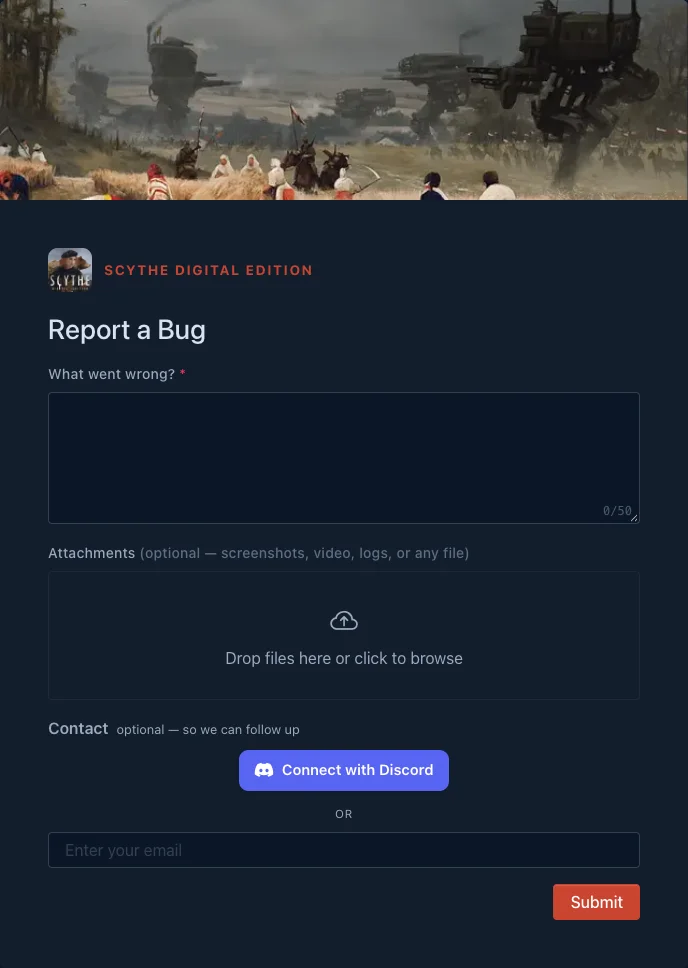
A public board can open a hosted form. A public board’s Report Bug / New Suggestion button can open one of your hosted forms instead of the sign-in and join flow, either for everyone or only for non-members. Linking a form to a public board
Bug forms can be pinned to a release. In the form editor, the Release setting files reports either under the latest published release (the default) or under a fixed release. This helps projects that run parallel release lines. If the pinned release is archived or deleted, reports fall back to the latest one. Form settings documentation
Security and Privacy
- Media uploads on public projects: only the bug’s reporter or your team can attach screenshots, videos or files to an existing bug, the same rule as on private projects.
- Two-factor sign-in: if you use two-factor authentication, signing in with a password, with GitHub or Discord, or through a password reset now always asks for your code. After 10 wrong codes, two-factor sign-in locks for an hour.
- Search no longer shows bugs or suggestions you aren’t allowed to open.
- Email sign-ups from disposable email services are rejected.
Quality of Life
Unreal crash reports — crashes with very deep call stacks (over 128 KB) are now trimmed instead of dropped. Crash reports are also accepted on projects with required custom fields.
/set autocomplete — the Discord bot now suggests setting names as you type /set.
Discord bot reliability — the bot handles Discord’s rate limits better and no longer creates duplicate suggestions when a request is retried.
That’s everything for this cycle. Questions or feedback? Find us on Discord.
— The BetaHub Team
Join for free today
Supercharge your team with the best bug tracking and player feedback tools. No credit card required, forever free.
Our Mission
At BetaHub, we empower game developers and communities with an engaging platform for bug submission. We foster collaboration, enhance gaming experiences, and speed up development. BetaHub connects developers, testers, and players, making everyone feel valued. Shape the future of gaming with us, one bug report at a time.


2026 © Upsoft sp. z o.o.