News /Jun 17, 2026 /13 min read
What's New in BetaHub — May & June 2026
Move items between projects, a Discord bug triage queue with Slack digests, two-factor authentication, audio in Unity bug reports, customizable public boards with voting, and a long list of improvements.

A large update covering May and June. The highlights: moving bugs and tickets between projects, a new Discord triage queue that batches reports for review, two-factor authentication, audio recording in the Unity plugin, customizable public boards with community voting, and a long list of improvements across the platform.
Move Bugs, Suggestions & Tickets Between Projects
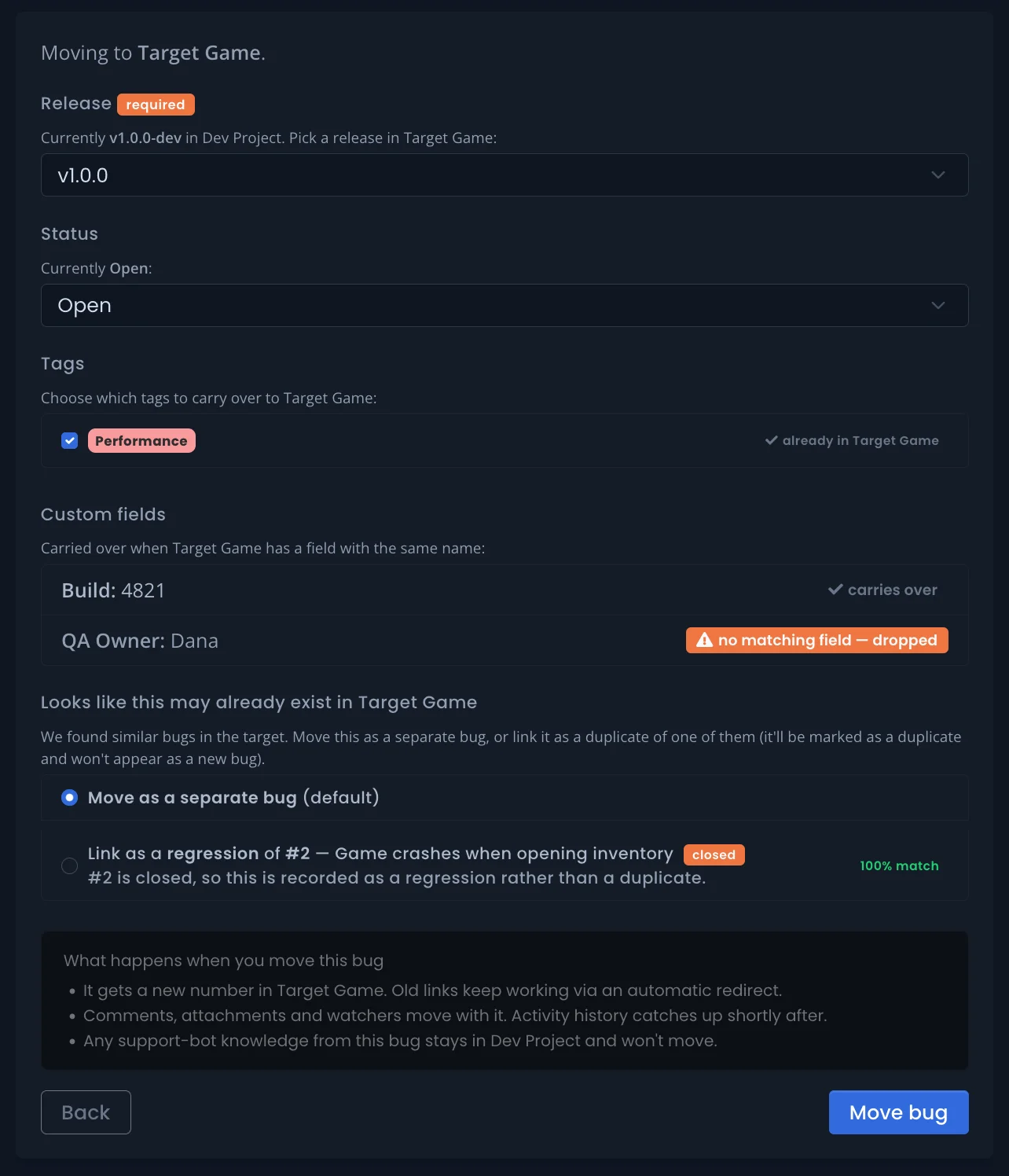
You can now move a bug, suggestion, or support ticket to another project in your organization. A guided step lets you pick the destination, choose which tags and details carry over, and optionally link the moved item as a duplicate of a similar item already in the destination.
Links to the old location keep working automatically — existing URLs redirect to the item’s new home.
Managing feedback documentation
Discord Bug Triage Queue
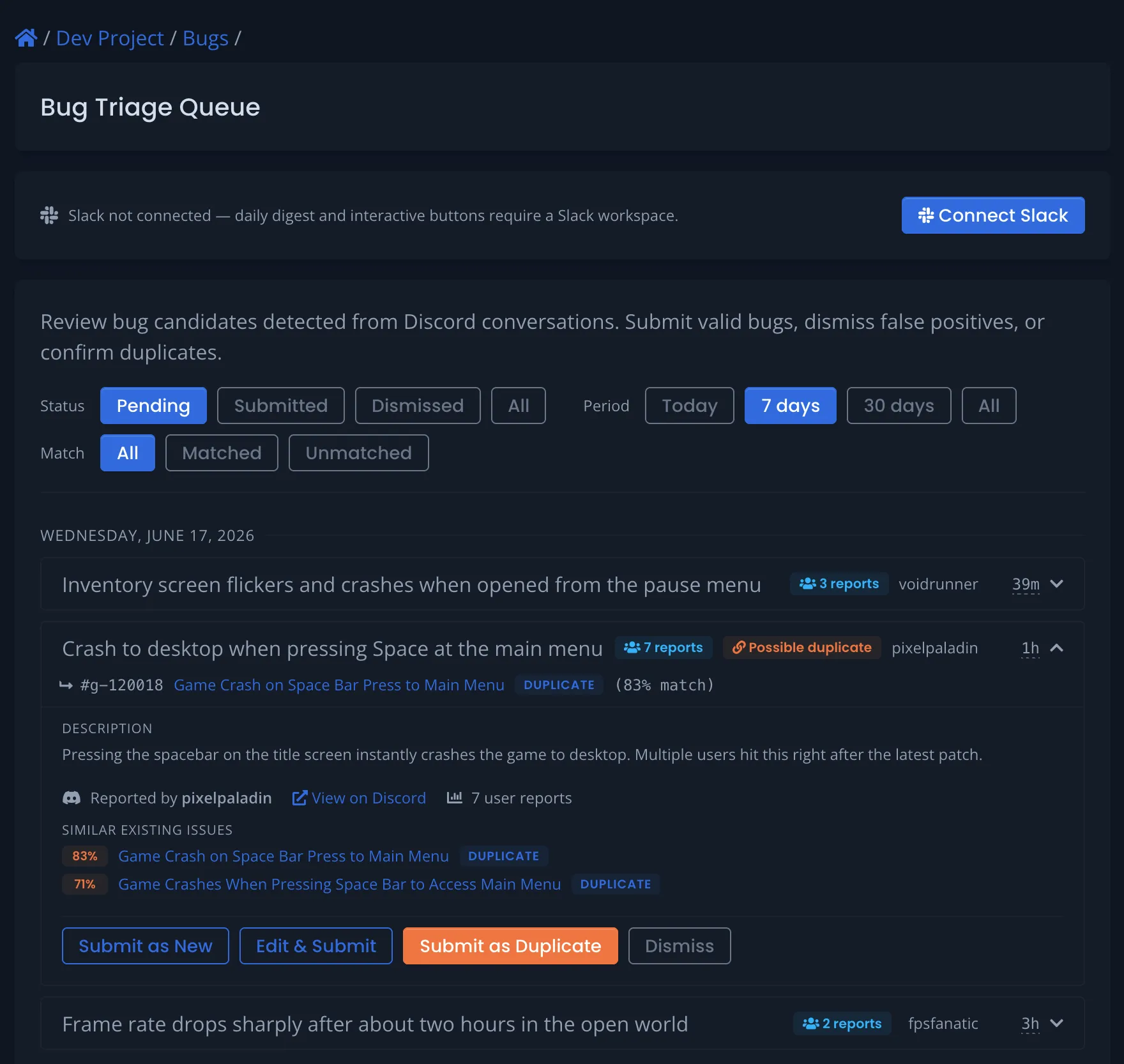
The Discord bot can now collect bug reports for review instead of creating issues immediately. Set the bot to triage mode with /set listen_mode triage and it gathers a day’s worth of messages from your bug channels, then sends them to BetaHub once daily for batch classification.
The classifier reads full conversations — not single messages — and extracts distinct bugs as candidates. Candidates land in a review queue on the dashboard, grouped by date, each with the top 5 similar existing issues shown inline. For each one you can submit, dismiss, or mark as duplicate. Image and log attachments from Discord are carried through to the candidate.
A Slack app delivers the same queue as a daily digest with approve/dismiss buttons. The digest schedule is configurable — pick any hour and timezone, with an optional skip-weekends toggle that respects your timezone. You can also trigger a batch manually with /set bug_triage_process.
| Bug Triage Queue documentation | Discord Bot documentation |
Community Voting from Discord
Players can react with a configured emoji on a bug thread’s opening post to upvote the bug and become a watcher — without leaving Discord. Votes feed the same heat-scoring algorithm that ranks bugs on your boards, and voters are automatically subscribed to updates.
Enable it per project with /set upvote_reaction <emoji> (set it to nil to turn it off). When active, the bug status card shows a voting hint.
| Heat scoring documentation | Discord Bot documentation |
Public Boards: Branding, Search & Voting
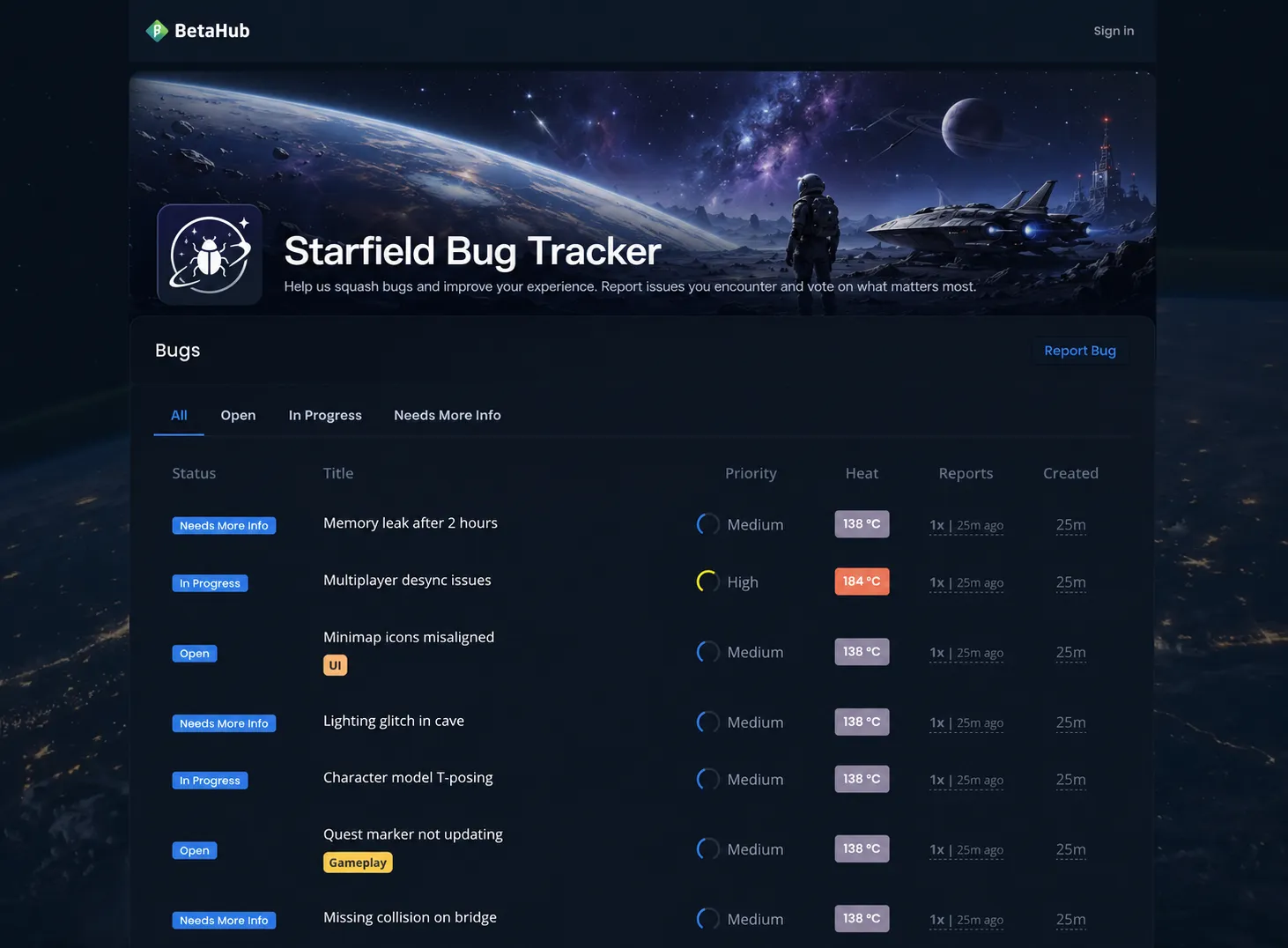
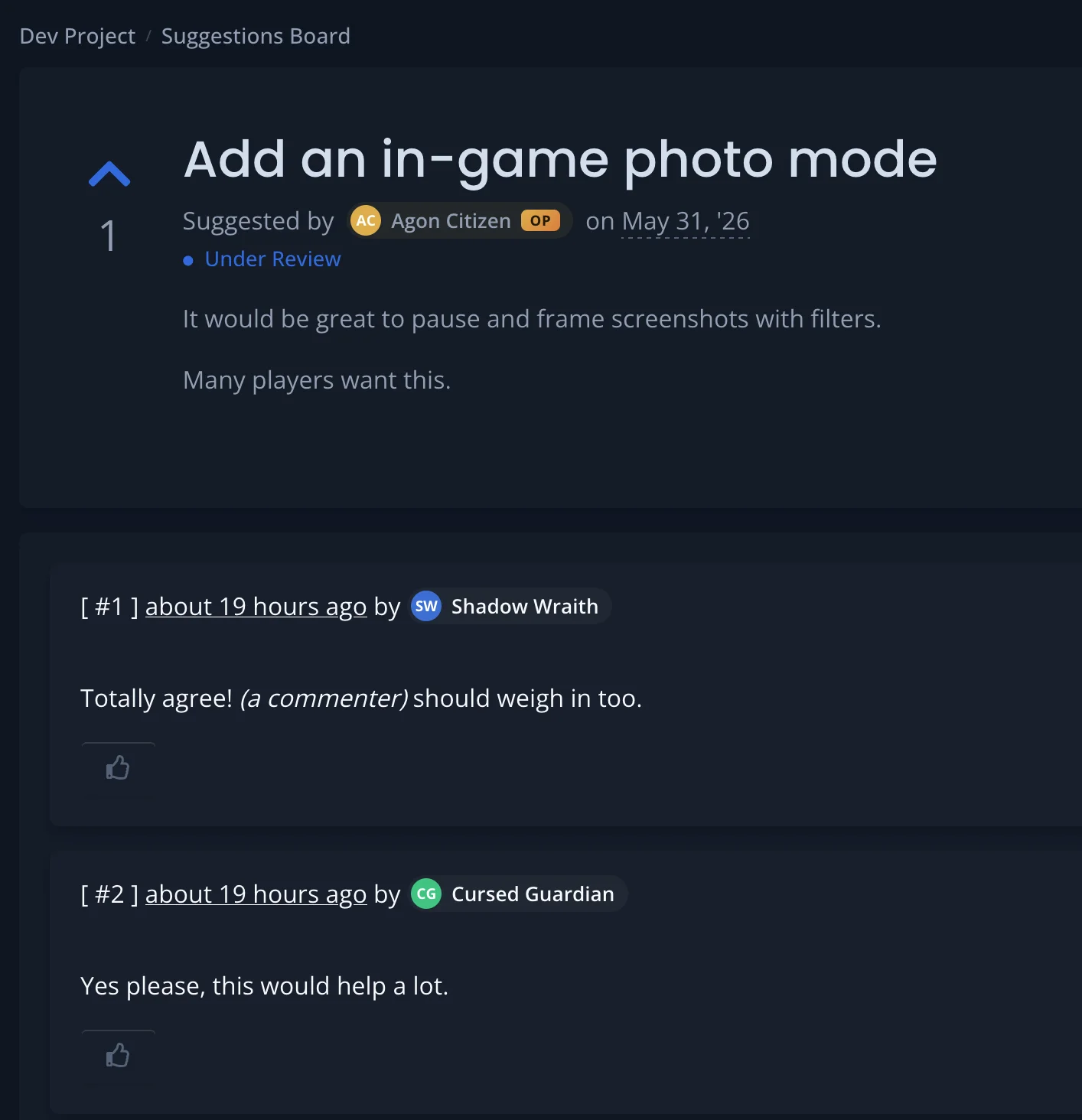
Public bug and suggestion boards picked up a set of customization and community features this cycle:
- Branding — customize each board independently with a title, description, logo, banner, and a page background (fade-to-gradient, fixed parallax, or tinted overlay). An accent color picker themes buttons, tabs, and highlights, and you can force light or dark mode. Enterprise plans with custom branding can hide the BetaHub navbar logo.
- Search — an optional search bar with a live dropdown showing matching results with highlighted terms, status badges, and tags. Press
/to focus, arrow keys to navigate, Enter to select. - Voting, pinning & curation — visitors vote on bugs (feeding heat scoring), developers pin important bugs to a highlighted section, and an optional Curated mode shows only bugs you manually add to the board.
- Private names — keep a board public without exposing who posted. Suggesters appear under a custom label you choose, and commenters get distinct anonymous names — auto-generated to match your game’s theme, or set your own. Your team still sees everyone’s real identity.
- Report Bug button — the public bug board now has a Report Bug button in the header, matching the New Suggestion button on the suggestions board.
- Redirect testers & visitors — a per-board switch automatically sends non-staff from the internal Bugs/Suggestions pages to the matching public board.
| Public Bug Board documentation | Public Suggestions Board documentation |
Two-Factor Authentication
You can now protect your account with an optional second verification step at sign-in. Choose an authenticator app (TOTP) or email codes, and get one-time backup codes for recovery.
GitHub and Discord logins are unaffected.
Account security documentation
Audio in Unity Bug Reports
Bug reports captured by the Unity plugin now include audio alongside video (plugin v1.8.0). Audio capture supports Unity’s built-in audio via AudioListener, and Wwise behind a BETAHUB_WWISE scripting define. Recording auto-pauses when the bug-report UI is shown and resumes on dismiss, with drift correction to hold sync over long recordings.
Audio capture is on by default (UnityAudioListener) after updating — set the capture mode to None if you don’t want audio recorded.
Three patch releases hardened it:
- v1.8.1 — fixed audio/video muxing failure on non-English OS locales (e.g. French decimal separators).
- v1.8.2 — cleaned up leftover
.wavand temp files between sessions, and orphaned audio files on quit/scene unload. - v1.8.3 — fixed audio/video desync in IL2CPP builds (the most recent video segment was being dropped). This fix requires the updated native libraries, not just the C# package.
Support Tooling: Response Templates & Knowledge Base
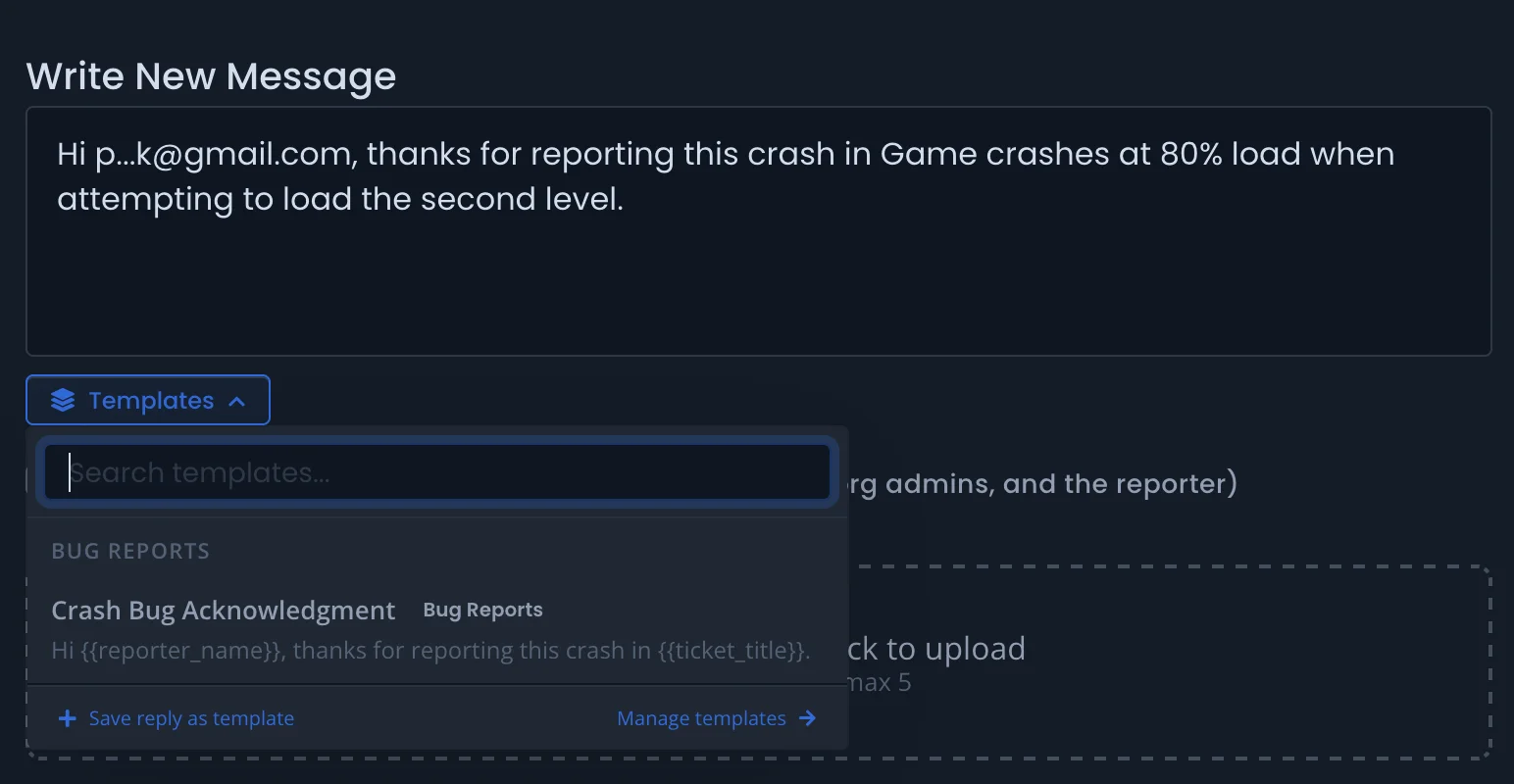
Response templates — save and reuse pre-written reply snippets on support tickets. Create shared templates for your team or personal ones, organize them by category, and insert them with one click from the reply editor. Templates support dynamic variables like the reporter’s name and ticket title, filled in automatically on insertion. AI-powered suggestions match templates to incoming tickets (monthly limits apply per plan).
Resolved tickets → knowledge base — when a ticket is solved or closed, an Add to Knowledge Base card appears in the sidebar. It uses AI to generate a clean knowledge article from the conversation (private comments excluded). Review and edit the title and content before saving. Available on all plans, subject to your knowledge base document limits.
| Response Templates documentation | Support Knowledge Base documentation |
Automation Rules: Assign Release & Discord-Channel Tagging
Two new automation capabilities:
- Assign Release — automatically set a release version on new bugs. Pick Latest published version or a specific release. If the bug already has a release, the rule skips it. Assignments and skips are recorded in the activity log.
- Discord channel tagging — a new Reported from Discord channel condition targets bugs from specific text or forum channels, and a new Assign Tags action adds tags to matching issues. For example, tag everything from your
#crasheschannel as “crash.” Tags are added alongside AI-predicted tags, never replacing them.
Automation Rules documentation
Smarter Integration Pushes
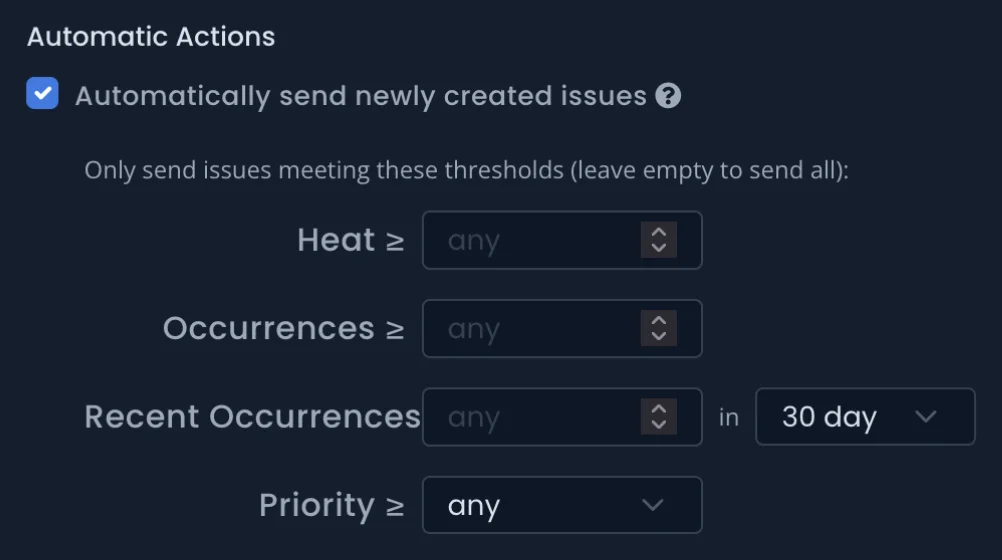
Occurrences threshold — control when bugs are sent to your project management tools based on how many times they’ve been reported. Set a minimum total occurrence count, or filter by recent occurrences within a 7, 14, 30, or 90-day window. Thresholds are re-evaluated automatically when new duplicates are detected.
Multi-line titles fixed — bug titles containing line breaks now push successfully to Jira, GitHub, GitLab, Linear, ClickUp, Asana, Monday, Notion, Fibery, and Redmine. Previously, services that require single-line titles (most notably Jira) rejected the push and the issue silently failed to sync.
Bug List Improvements
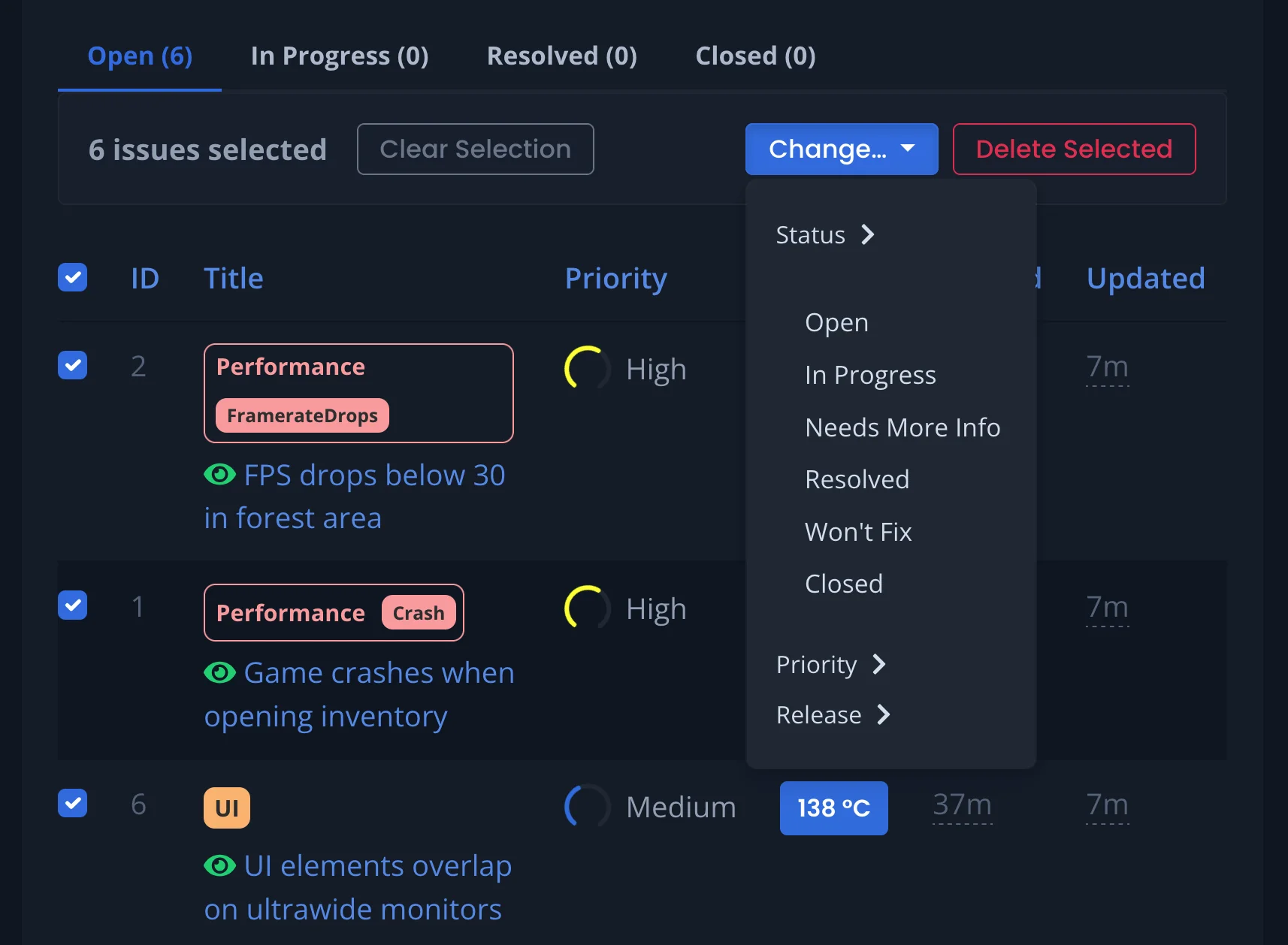
- New filters — With Media (only bugs that have screenshots, videos, or logs) and Sent to (bugs pushed to a specific integration, or any connected integration).
- Bulk edit release — reassign many bugs to a different release at once. Bulk actions are now grouped under a single Change… menu where you can set status, priority, or release for every selected bug.
- Filter by report date — narrow the list to bugs reported within a date range, useful for finding everything that came in around a specific build.
- Display menu — declutter the list by hiding tags, attachment indicators, or the watching icon. Your choices are remembered across every project.
Managing feedback documentation
Media Lightbox & Log Viewer
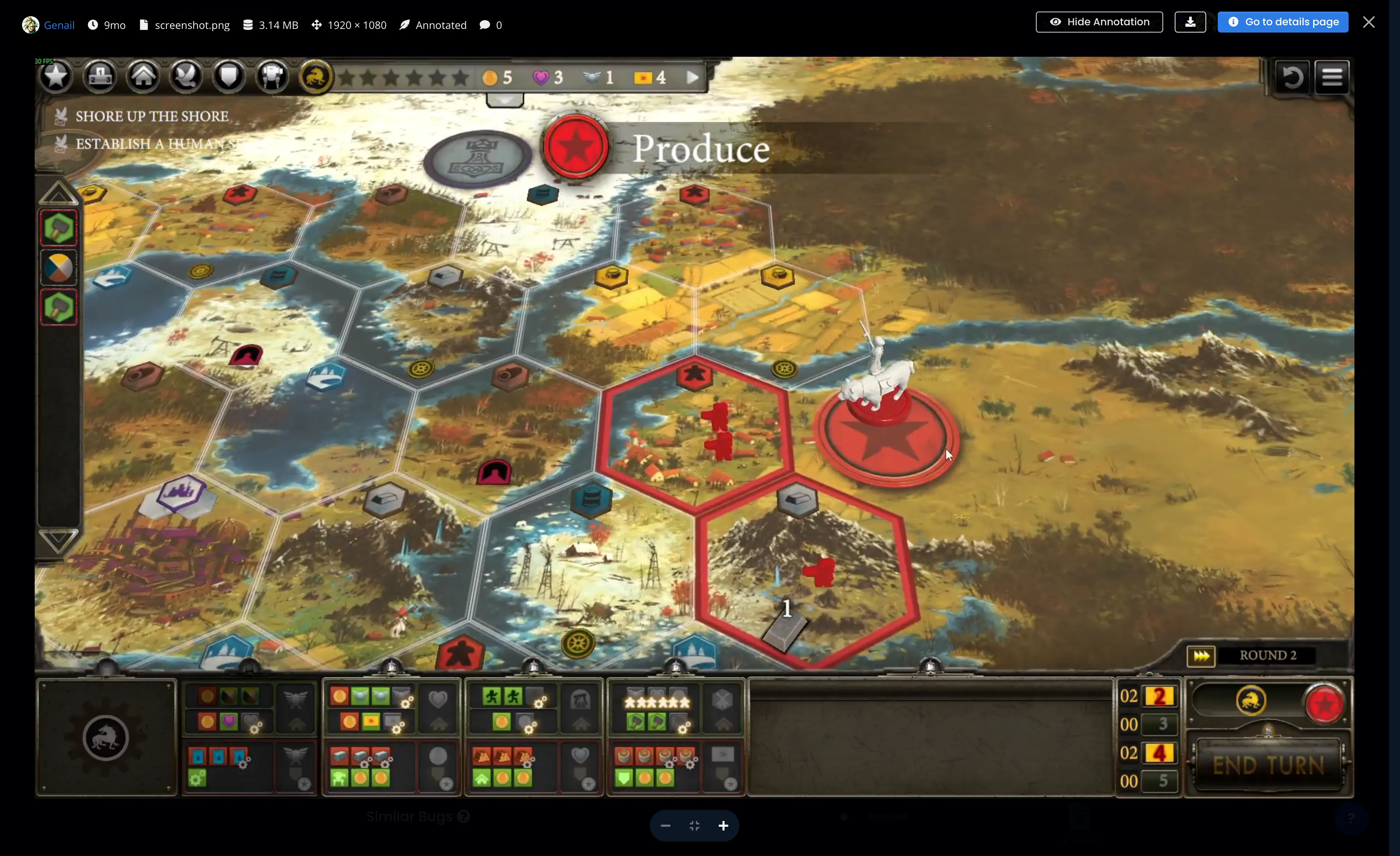
Clicking any screenshot or video clip anywhere in BetaHub now opens it in a full-viewport lightbox with mouse-wheel zoom, click-and-drag pan, pinch-to-zoom on touch devices, and pixelated rendering at high zoom. A header info pill shows uploader, upload time, filename, file size, dimensions, and comment count. Annotations can be toggled on and off without leaving the preview, and there’s a Download button.
Log files get a built-in viewer with line numbers, per-line anchor links, and a wrap toggle. Comment image attachments open in the same lightbox and can be removed individually without deleting the whole comment.
Developer & Integration Updates
Unreal Engine 5 Plugin (v1.5.5)
- Fixed a submit button that stayed clickable during submission, which could send duplicate reports, and a button that got stuck on “Submitting…” when the form widget was reused.
- The duplicate-submission guard now also protects Blueprint and custom callers that invoke
SubmitReportdirectly, not just clicks on the default button. - The plugin is now listed on the Fab marketplace for direct install into UE projects.
Unity Plugin (v1.7.0–v1.8.3)
- Client event telemetry (v1.7.0) — the plugin reports upload lifecycle events (started, completed, failed, recording errors) to the backend for diagnostics.
- Audio recording and its fixes are covered in Audio in Unity Bug Reports above.
Discord Bot
- Customizable comment notifications — the messages the bot posts for comments (on issues, feature requests, screenshots, videos, and log files) are now Mustache templates you can edit under
/info → Customize Responses, with separate forum and DM variants. - Configurable confirmation channels — route reaction-triggered bug/suggestion confirmations to a dedicated channel with
bug_confirmations_channel/suggestion_confirmations_channel, leaving a ✅ on the original message instead of replying in-line. - Quiet forum mode —
/set listen_mode_quietruns the bot with suppressed forum messages, available to every project. - Reliability fixes —
/register_bugand/register_suggestionon a forum thread now attribute the issue to the original poster instead of the admin; a failed forum post no longer retries forever (it backs off and gives up after 5 attempts); and status and priority forum tags no longer overwrite each other.
AI Assistants (MCP)
Connecting an AI assistant to a BetaHub project now leads with a hosted MCP endpoint (mcp.betahub.io); the self-hosted option is a fallback. The setup page includes ready-to-paste configs for Gemini CLI, VS Code / Copilot, Cursor, opencode, and Codex CLI.
A new Similar Bugs API finds bugs semantically similar to a given one, for building your own duplicate-catching tools and agents.
| AI Assistants documentation | API access documentation |
Quality of Life
Redesigned emails — every BetaHub email (comment and status notifications, release announcements, invitations, account and billing messages) has a cleaner, consistently branded design.
Mentions-only notifications — a new per-project notification mode between “Do not notify” and “Instant notifications”: you won’t get general activity, but you’ll still be notified on direct @mentions. The “Do not notify” setting now actually silences everything (previously some notifications, most notably support ticket replies, ignored it). Notifications docs
Comment delivery status — the indicator next to comments now shows which channel delivered the message, with a Discord or email icon, a persistent green checkmark on delivery, and a red dot on failure. When both channels are active, each shows its status separately.
Webhook reliability — webhooks now fire reliably for every new bug and ticket, including bugs submitted through the Discord bot, where AI processing could previously delay the database write past the delivery window.
Knowledge interaction transparency — interaction detail pages now show whether the bot’s answer was actually sent or suppressed, a step-by-step activity timeline (with a link to any bug it created), and a clearer “Sent to user” column. Support Knowledge Base docs
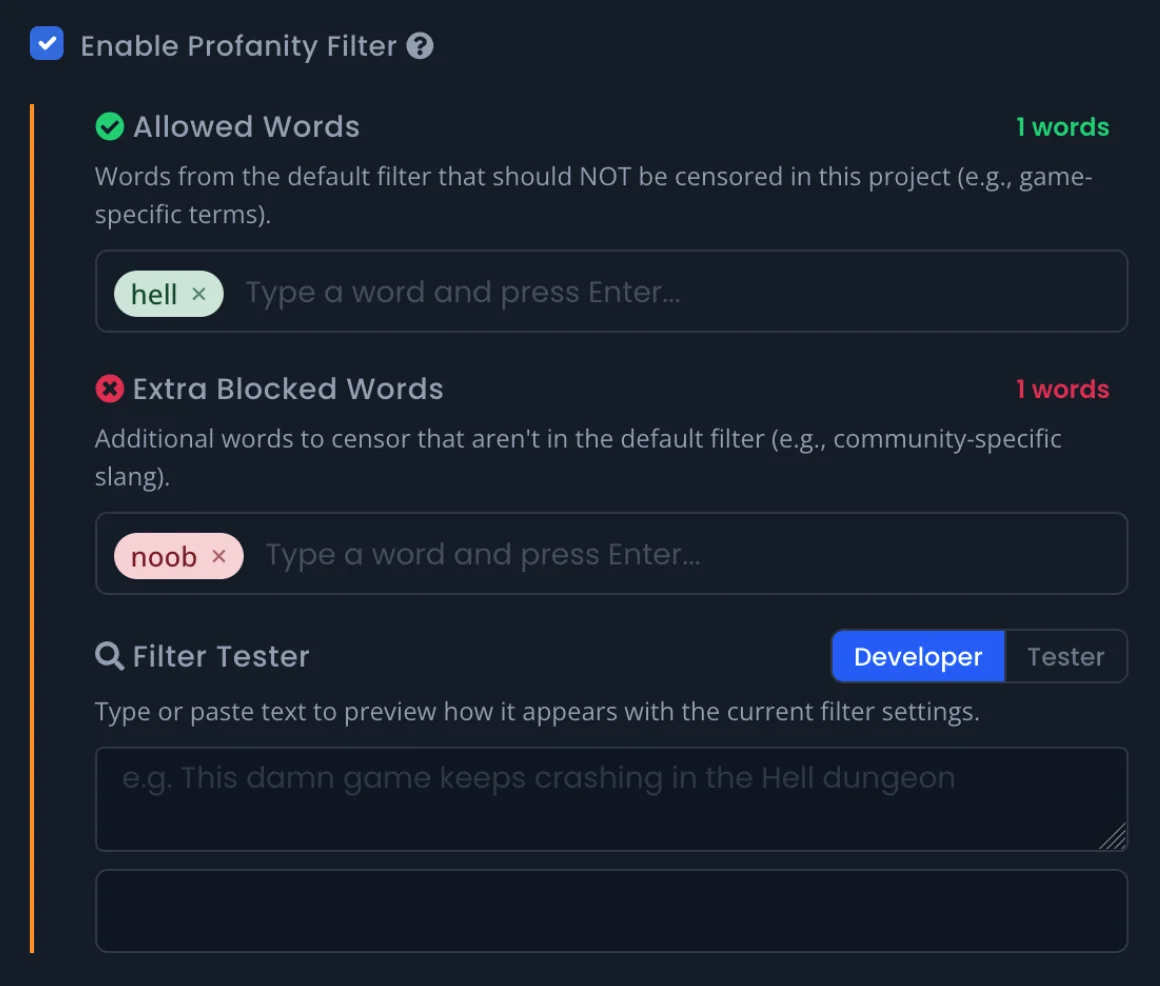
Customizable profanity filter — tune the filter per project: add game-specific terms (character or location names) to an allowed list, or extra words to block. A built-in tester previews how text looks to developers and testers, and clicking a highlighted word in a report opens a quick “allow” menu. Profanity filter docs
Transfer organization — org admins can transfer ownership to another BetaHub user by email or Discord username, with a review page showing exactly what changes. Lookups are rate-limited to 5 attempts per hour.
Discord custom fields fix — the Discord bot’s /set command now works with custom fields. Game-SDK submissions also no longer drop custom-field values on suggestions and tickets. Custom fields docs
Video processing fixes — screen recordings with odd pixel dimensions, and certain VP8/WebM clips, no longer silently fail to transcode.
Persistent activity stats — profile bug, comment, and suggestion counts no longer drop when issues are deleted.
Search completeness — a reliability fix to the search index reconciles issues that previously could be missing from search results due to silent indexing failures.
Web spider improvements — crawls of Cloudflare-fronted wikis (e.g. wiki.gg) now succeed for more pages. The spider identifies itself, crawls at one request per second, retries transient errors with backoff, and skips URLs disallowed in robots.txt. Support Knowledge Base docs
Billing fix — returning customers re-subscribing through Paddle could be charged without being upgraded; this is fixed.
Security & dependency updates — routine security patches, including fixes for rack-session (CVE-2026-39324) and httparty (CVE-2025-68696).
That’s everything for this cycle. Questions or feedback? Find us on Discord.
— The BetaHub Team
Join for free today
Supercharge your team with the best bug tracking and player feedback tools. No credit card required, forever free.

Our Mission
At BetaHub, we empower game developers and communities with an engaging platform for bug submission. We foster collaboration, enhance gaming experiences, and speed up development. BetaHub connects developers, testers, and players, making everyone feel valued. Shape the future of gaming with us, one bug report at a time.

2026 © Upsoft sp. z o.o.