Developer Dashboard
The Developer Dashboard is your project’s home when you open it as a developer. Instead of a static overview, it adapts to where your project is:
- Before any feedback arrives, it’s a short setup guide that helps you get reports flowing.
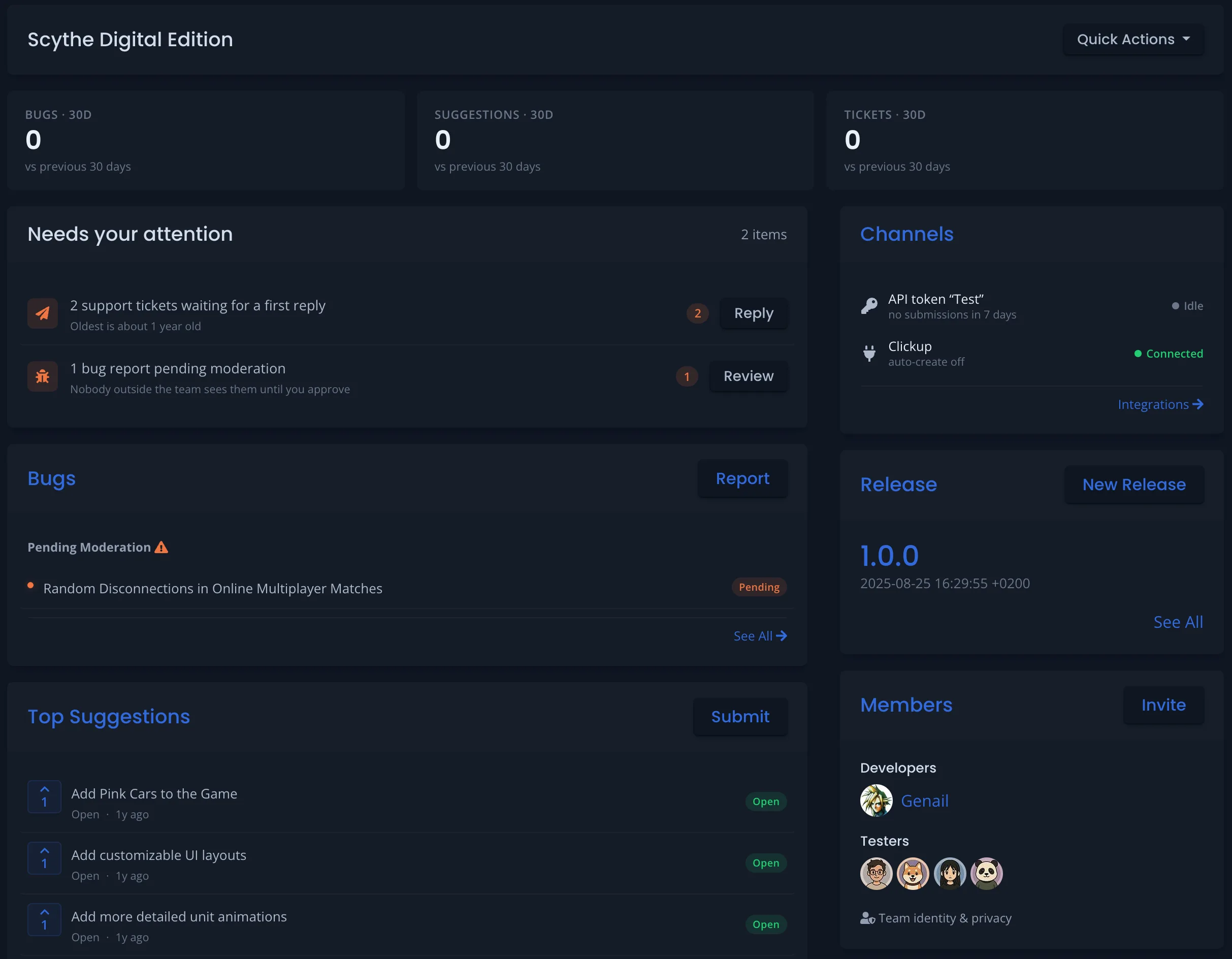
- Once reports start coming in, it becomes a workspace that surfaces what needs your attention — waiting tickets, reports to review, the hottest bugs, and more.
Testers and the public still see the normal project page; the dashboard is only shown to the project’s developers. New projects get it automatically.
Getting set up
Before your first report lands, the dashboard asks one question: how will feedback reach you? Pick the channel your players already use, connect it, and send yourself a test report — the moment that report arrives, the page turns into your workspace.
The five channels:
- **Discord Bot** — players report with a command or by reacting to a message in your server. Best if you already run a community on Discord.
- Game SDK — a package for Unity, Unreal, or Roblox. Reports arrive with logs, screenshots, device info, and a video clip. Best for in-game bug reporting. See Game Engine Integration.
- Web form or widget — a hosted feedback page or the HTML Feedback Widget you drop on your site or store page.
- Testers on BetaHub — invite testers directly; they report from the project page and download the builds you publish as releases.
- Steam discussions — connect your game’s Steam Community Hub and BetaHub imports the bug reports and suggestions players already post there, checking daily. Recommended when your project lists Steam as a platform. Available on Pro and Enterprise; on other plans it carries a Pro tag. See Steam Discussions.
For Steam, the last step is the first crawl rather than a test report. If that crawl finds nothing to import yet, the step still completes and says so; the page turns into your workspace with the first imported bug or suggestion.
You don’t have to choose just one — the others are always available later from your integrations and settings. While you wait for that first report, the dashboard also offers a few optional steps that make your project more useful: inviting your team, filling in your game’s details, publishing a release, and adding a banner and description.
Your workspace
Once feedback is arriving, the dashboard focuses on what you need to act on:
Needs your attention
A single list of everything waiting on you, so nothing slips through:
- Support tickets that haven’t had a first reply
- Bug reports and suggestions awaiting moderation
- Reports where you’ve asked the reporter for more information and are still waiting
- People requesting to join the project
- Sentiment dips detected in your community
- Problems your Discord Bot has reported (for example, a channel it can no longer read)
- Bug feedback forms whose chosen release was archived or deleted, so new reports go to the latest release instead
- Questions your support assistant couldn’t answer
Each item links straight to where you act on it. Items disappear from the list as you clear them.
Pulse
A 30-day snapshot of your bugs, suggestions, and tickets, each with the change against the previous 30 days, so you can see at a glance whether activity is rising or falling.
Bugs and suggestions
The bugs most worth your attention first — ranked by Heat, BetaHub’s measure of how much a bug is affecting players — alongside your top-voted suggestions.
Recommended for you
Contextual, dismissible suggestions based on how your project is actually being used — for example, adding a banner and description so testers know what they’re looking at, turning on the Support Knowledge Base when tickets pile up, connecting an issue tracker once you have a lot of open bugs, or connecting your Steam Community Hub if your game is on Steam.
Channels
A health summary of every way feedback is reaching your project — your Discord bot, your Steam discussions, API tokens (used by your game SDK or any other API client), hosted forms and widgets, and connected integrations — so you can spot a channel that has gone quiet or stopped working.
See Also
- Discord Bot — Set up community feedback through your Discord server
- Managing Feedback — Triage and workflow best practices
- Core Features — Issue statuses, heat scoring, and duplicate detection
- Advanced Features — Sentiment analysis, knowledge base, and the activity feed
- Steam Discussions – Bugs and sentiment from Steam boards
- Sentiment Checks – Ask whether a fix, release or campaign landed